
Why Your AI Videos Feel Static
Read a typical AI video prompt: "A cyberpunk street at night, neon signs, rain." That describes a photograph. The video model then guesses how the camera should behave — and guesses badly, with jittery pans and warping perspectives. Professional footage feels cinematic because someone chose a camera move on purpose. If your prompt names the move, the model follows it; if it does not, the model improvises. The fix is a vocabulary of camera moves plus a prompt formula that places the move where the model notices it.
The Camera-Move Vocabulary
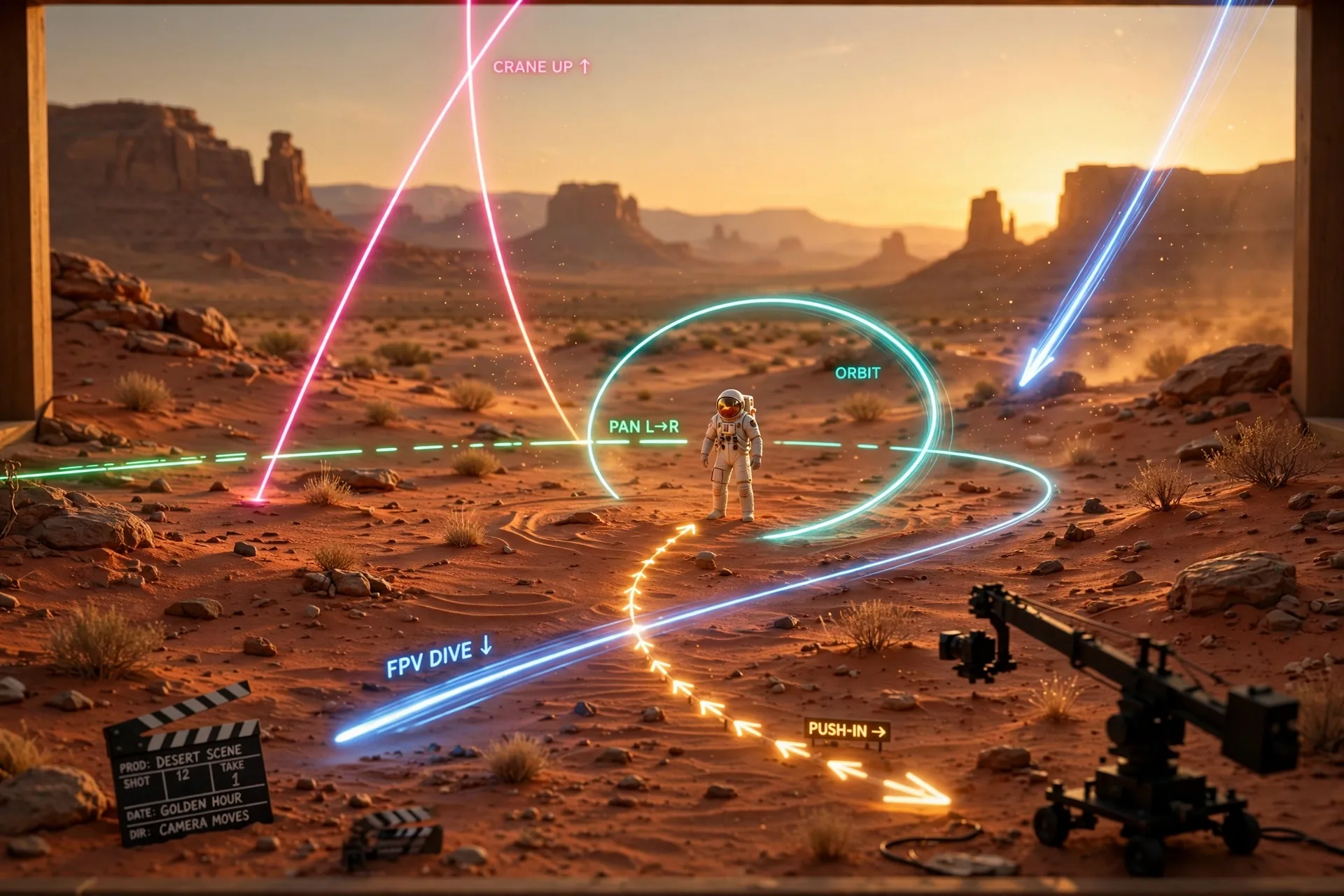
- Push-in (dolly in): camera glides toward the subject — builds intimacy and focus
- Pull-out (dolly out): camera retreats — reveals context and scale
- Orbit / arc: camera circles the subject — heroic, dramatic, 360-product energy
- Tracking shot: camera moves alongside the subject — action and momentum
- Pan: camera swivels left/right on a fixed point — scanning a scene
- Tilt: camera tilts up/down — scale, power, revelation
- Crane / jib: camera sweeps up and over — epic establishing shots
- Aerial / drone: high overhead, swooping descent — landscapes, cityscapes
- FPV drone: fast, low, diving flight — adrenaline, chase energy
- Handheld / gimbal: subtle human shake — documentary realism
- Whip pan: fast blur transition between two points — energy and cuts
The Prompt Formula: Move + Subject + Environment + Mood
Put the camera move FIRST in the prompt, then the subject, then the environment, then the mood. Models weight early tokens more, so "slow push-in on a lone astronaut" behaves very differently from "an astronaut with a slow push-in." One move per shot — stacking three moves ("orbit while craning up and whip panning") is the fastest way to get warping and glitches.
Slow cinematic push-in on a lone astronaut standing in a red desert at golden hour, dust drifting through the light. Camera starts wide and glides smoothly toward a medium close-up. Volumetric lighting, shallow depth of field, epic scale, film grain, 24fps cinematic look.
| Move | Mood it creates | Best subject |
|---|---|---|
| Slow push-in | Intimacy, focus | A face, a product detail |
| Orbit | Heroic, dramatic | Cars, characters, products |
| Crane up | Epic scale | Landscapes, crowds, architecture |
| FPV dive | Adrenaline | Chases, cities, nature reveals |
| Handheld | Realism, urgency | Documentaries, interviews, street scenes |
| Pull-out | Context, loneliness | A small figure in a vast place |
Moves to Avoid (and Why)
- Whip pans on faces — models smear features during fast blurs; use them only between scenes
- 360 spins around people — hair and faces warp; reserve spins for objects and landscapes
- "Zoom" alone — say push-in or pull-out instead; "zoom" reads as a cheap lens trick and looks dated
- Combining opposite moves ("push-in while pulling out") — the model cannot do both and will glitch
A Reusable One-Line Template
[Speed] [move] on [subject] in [environment], [lighting detail]. Camera [start state] and [end state]. [Mood words], cinematic look, no jitter, no warping.
Frequently Asked Questions
Where should the camera move go in an AI video prompt?
First. Models weight early tokens more, so lead with the move ("slow push-in on a lone astronaut in a red desert") rather than burying it at the end. One move per shot — stacking multiple moves causes warping and glitches.
Why does my AI video have weird jittery motion?
Usually because the prompt described a static scene and the model improvised the camera behavior. Name a specific move plus a speed word ("slow sweeping orbit"), keep moves simple, and avoid stacking opposing directions.
Can I do a 360 spin around a person?
It is risky. Fast spins and whip pans smear faces and warp hair on most current models. Reserve 360 moves for objects, products, and landscapes, and use slower, steadier moves — push-ins, arcs, crane shots — for people.
Which camera move is best for product videos?
The slow orbit: it circles the product heroically, shows every angle, and reads as premium. For detail shots, use a slow push-in toward the feature you want to highlight. Keep the background simple so the motion stays clean.
Do these prompts work in every AI video tool?
The vocabulary is tool-agnostic — it works in Kling AI, Seedance, Google Flow, vivago, and any text-to-video model. Some tools also have camera-control buttons; use the prompt for fine control and the buttons for speed.