
The Consistency Problem
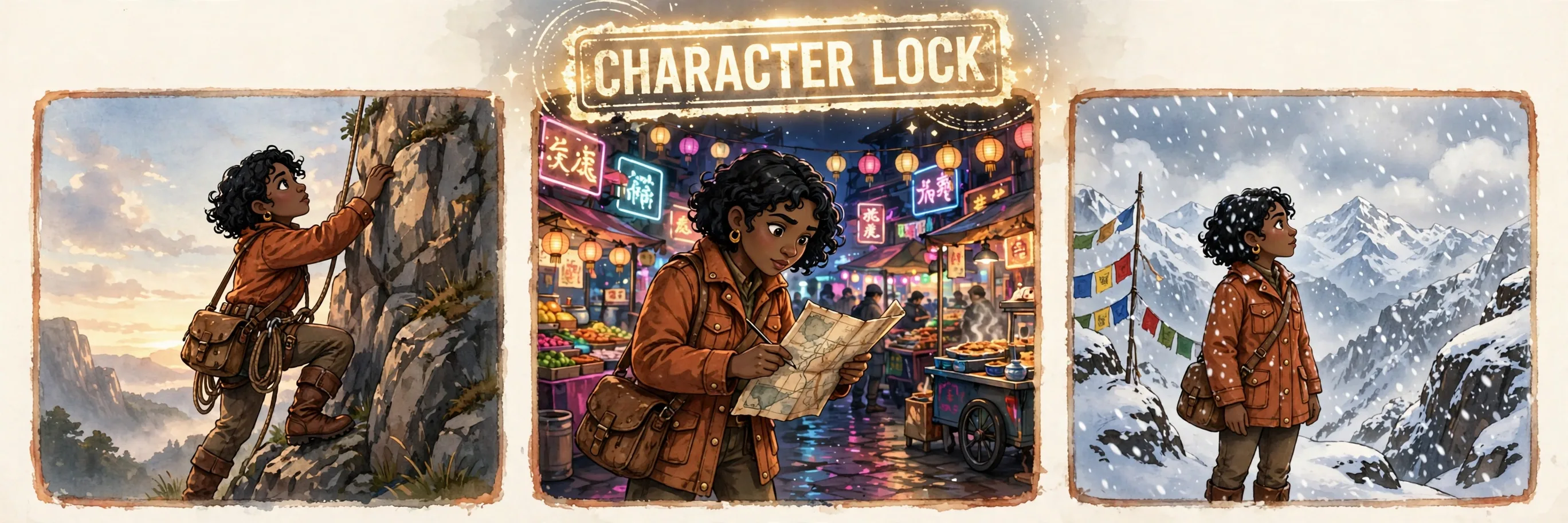
Generate the same character twice and you get two different people: the jacket changes color, the face shifts, the art style drifts. That happens because most prompts describe the character loosely — "a young woman explorer" — and the model re-invents the details every time. Consistency is not a model feature you toggle; it is a prompting discipline. The method that works: lock a fixed character description block and paste the identical block into every prompt in the series.
Step 1: Write the Character Lock Block
Write one paragraph that fully specifies the character and never changes: age and build, face shape and features, hair style and color, eye color, signature outfit with exact colors, and one distinctive accessory. This block becomes a legal document — copy it verbatim into every prompt. Even small paraphrases ("red jacket" vs "crimson coat") let the model drift.
CHARACTER LOCK: Amara, 28-year-old woman, warm brown skin, round face, short natural black curls, dark brown eyes, small gold hoop earrings. Signature outfit: rust-orange canvas field jacket with brass buttons, cream turtleneck, dark denim jeans, brown leather boots. Always carries a worn leather satchel. Illustrated in a warm, painterly storybook style, soft evening light.
Step 2: Scene Prompts Reference the Lock
- Paste the full CHARACTER LOCK block at the start of every prompt — never summarize it
- Then add the new scene: action, setting, camera angle, lighting mood
- Keep style words identical across the series ("warm, painterly storybook style")
- Change only the action and environment between frames — the character block stays frozen
- For multi-character scenes, lock each character in a separate block and paste both
| Technique | What it fixes | When to use |
|---|---|---|
| Identical description block | Face/outfit drift | Every series — the baseline method |
| Reference image input | Hard identity matches | When the tool supports image references (Nano Banana 2.1, Ideogram) |
| Seed reuse | Style drift | When the tool exposes a seed for near-identical compositions |
| Character sheet | Large projects | Comics, campaigns: one sheet with front/side/expressions to reference |
| Negative prompts | Mutation of details | Add "no changing clothes, no face change" to reinforce the lock |
Step 3: Use Reference Images When Available
When the tool supports it, attach a reference image of your character along with the text block. Nano Banana 2.1 supports up to 14 reference images and can track up to four distinct characters across editing turns; Ideogram and other editors accept character references too. The reference image is your anchor — the text block is your insurance. Use both together and drift drops dramatically.
A Reusable Series Template
[CHARACTER LOCK block verbatim]. Scene: [action] in [setting], [camera angle]. Lighting: [mood]. Style: [same style words as the lock]. No changes to the character's face, outfit, or accessories.
Frequently Asked Questions
Why does my character's face change between images?
Because the description changes between prompts. Write one fixed paragraph, pasted verbatim into every prompt, placed before the scene description.
Do I need a reference image, or is text enough?
Text alone works surprisingly well if the lock is detailed and identical every time. A reference image makes matches much stronger when the tool supports image input — use both together for the best consistency.
How many characters can I keep consistent at once?
Most multi-reference tools track a handful well — Nano Banana 2.1 handles up to four distinct characters and ten objects across turns. Lock each character in its own block, and keep group scenes simpler in pose and framing than solo shots.
What is a character sheet and when do I need one?
A character sheet is a single image showing your character from the front, side, and in a few expressions. Make one for large projects like comics or campaigns — it becomes the visual bible the whole series is checked against.
Should I use the same seed for every image?
Seeds help with style consistency, not identity. Reusing a seed keeps composition and mood similar, but the character lock and reference images are what keep the face and outfit stable. Combine all three for a series that looks like one shoot.